How to use this prompt on ChatGPT
📝 Prompt: Luxury birthday poster design
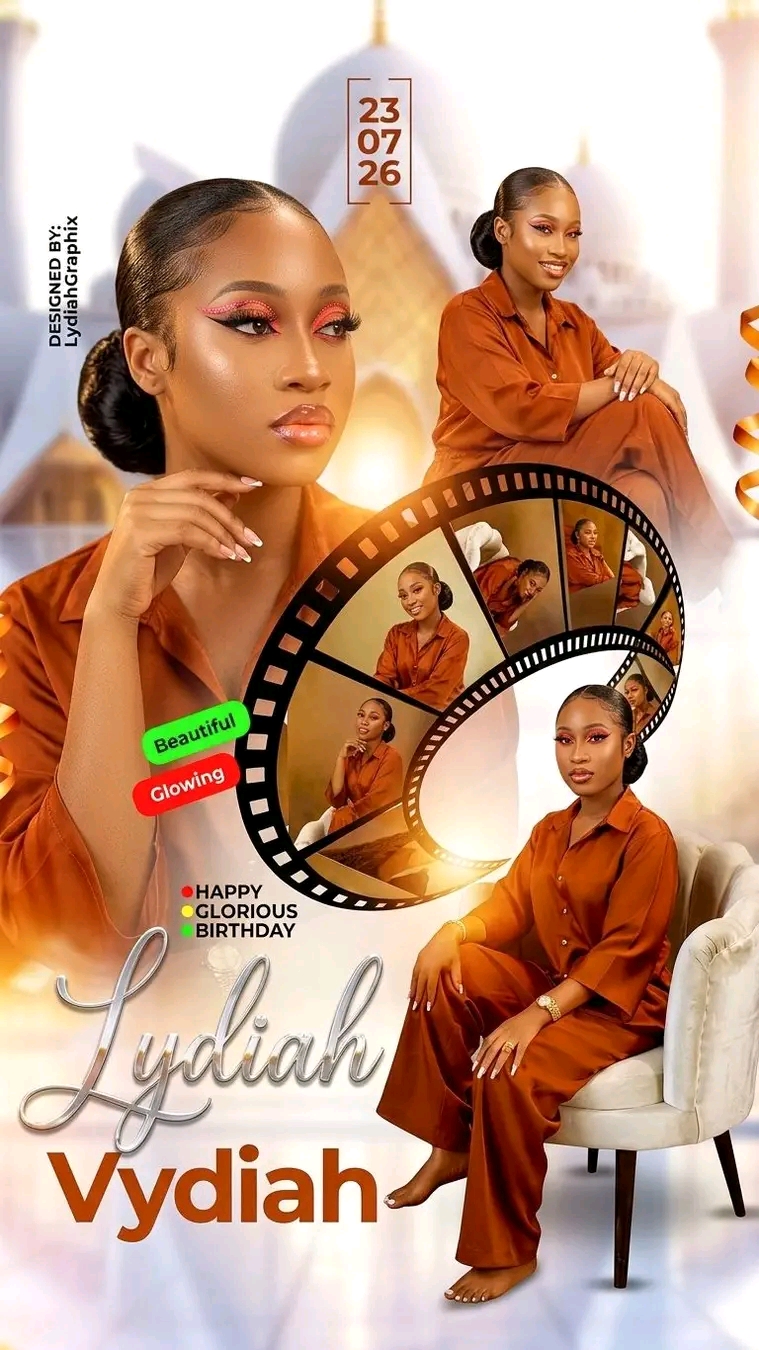
Luxury birthday poster design featuring a young woman in multiple elegant portrait poses arranged in a cinematic collage. Large close-up portrait on the left, seated portrait on the lower right, and additional portraits displayed inside a curved metallic film strip element. Soft cream, ivory, champagne gold, and warm beige color palette. Blurred palace-inspired architecture with domes and towers in the background, dreamy atmospheric depth, soft golden-hour lighting, smooth skin texture, high-end studio photography, glossy premium magazine aesthetic, luxury celebration theme. Elegant typography with the celebrant's name in large metallic silver script at the bottom, birthday greeting text above, modern date placement near the top center, decorative gold ribbon accents on both sides, plush carpet and modern accent chair, ultra-detailed, professional graphic design, photorealistic, premium birthday flyer, balanced composition, depth of field, 8K quality, sharp focus, clean background, sophisticated and glamorous.
For Midjourney, add:
--ar 2:3 --v 7 --stylize 250 --quality 2
For Photoshop AI or Flux, you can end with:
highly detailed, realistic lighting, luxury poster design, professional retouching, print-ready, ultra sharp, masterpiece.
For Midjourney, add:
--ar 2:3 --v 7 --stylize 250 --quality 2
For Photoshop AI or Flux, you can end with:
highly detailed, realistic lighting, luxury poster design, professional retouching, print-ready, ultra sharp, masterpiece.
📖 Step-by-Step Instructions
💻 On Desktop (Computer)
- Click "Copy Prompt" – a loader will appear then the button confirms the copy.
- Click "Open ChatGPT (Web)" to launch ChatGPT in a new tab.
- Paste the prompt into the chat box (Ctrl+V / ⌘+V).
- If you have a ChatGPT Plus subscription, you can use DALL‑E to generate images – upload your photo when prompted.
- Press Enter and let the AI create your masterpiece.
📱 On Mobile (Phone/Tablet)
- Download the official ChatGPT app from the Google Play Store (Android) or the Apple App Store (iOS).
- Open the app and log in to your OpenAI account.
- Tap the chat input, then long-press and choose "Paste" to insert the copied prompt.
- If you want to use an image, tap the attachment icon (paperclip or image) and select a photo from your gallery.
- Tap the send button and wait for the AI to generate the result (requires ChatGPT Plus for DALL‑E image generation).
💡 Note: For image generation, ChatGPT requires a Plus subscription and the DALL‑E model. The prompt works best when you provide a reference photo.