How to use this prompt on ChatGPT
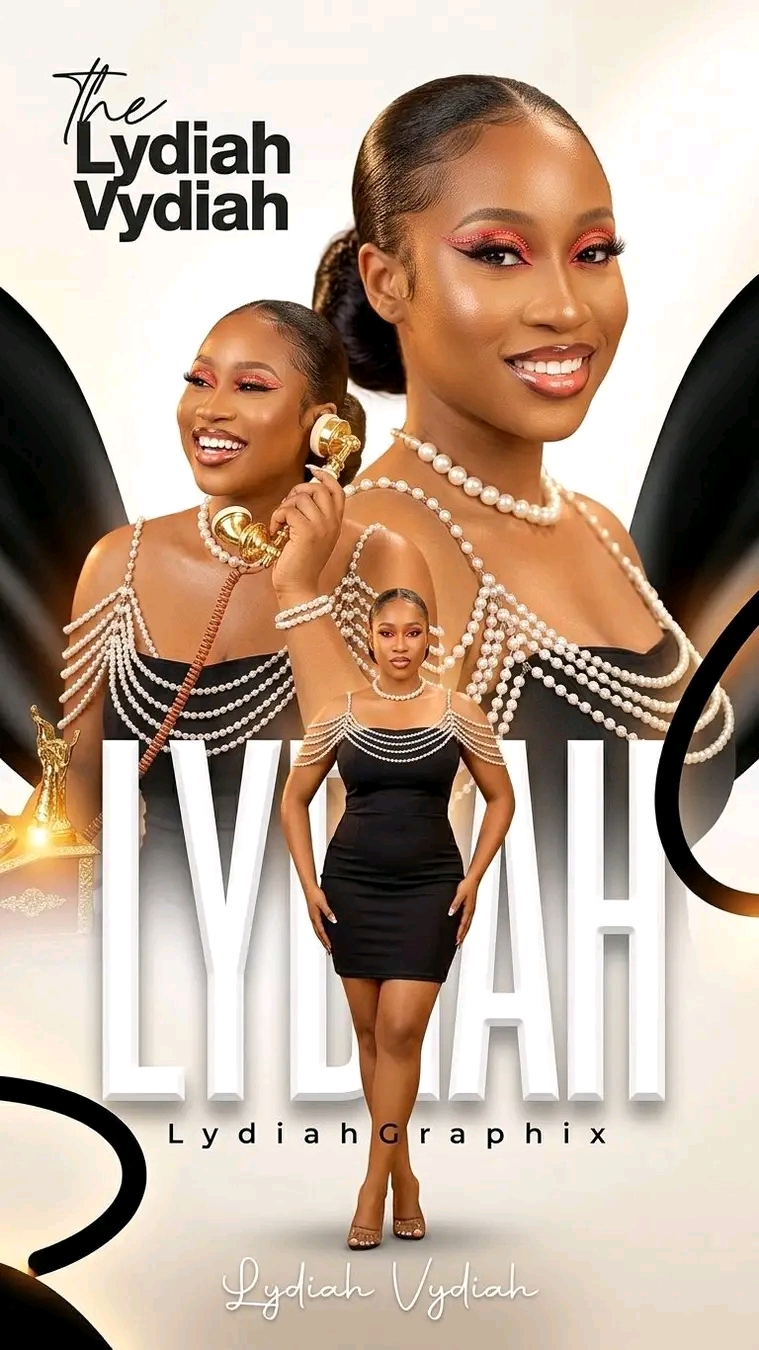
📝 Prompt: birthday poster
Create a luxury, high-end birthday poster that looks EXACTLY like a professionally composited Photoshop artwork, not an AI-generated image. This is a multi-image composite, not a single render. Every subject must feel integrated into the same lighting environment, not cut-and-paste. 🚨 CORE RULE (READ FIRST — NON-NEGOTIABLE) NO blurry output anywhere NO soft faces NO AI smoothing NO washed skin 👉 Skin must be: ultra-detailed high-frequency texture visible (pores, natural detail) glowy but NOT plastic crispy sharp at 8K zoom 📐 CANVAS Size: 7680 × 4320 8K resolution PNG (lossless) Ultra high dynamic range look Every edge must be razor sharp 🧱 COMPOSITION (EXACT REPLICATION STYLE) Structure: RIGHT: dominant large portrait (close-up) LEFT: secondary portrait (mid-shot, expressive) CENTER FRONT: full-body subject 👉 IMPORTANT: Subjects must overlap naturally, not spaced apart. Right portrait sits behind Left portrait sits slightly in front of right Full-body subject sits in front of typography and both portraits This creates depth stacking (Z-axis layering) 🎯 REAL COMPOSITING RULE (THIS FIXES YOUR MAIN ISSUE) Do NOT place subjects flatly. Instead: Match same light direction across all subjects Add contact shadows where subjects overlap Add ambient light wrap from background onto edges Add color bounce (warm tones from below) 👉 This makes it feel “shot together,” not pasted. 🎨 BACKGROUND (MATCH ORIGINAL FEEL) Top: clean off-white (#F3F3F3) Bottom: deep chocolate brown (#1A0F0B) Add: Smooth vertical gradient blend NO harsh transitions Side Shapes: Large curved dark shapes (left & right) Slight blur ONLY on edges (not full blur) These frame the subject like wings 💡 LIGHTING (CRITICAL FOR REALISM) Setup: Key light: front soft warm light Fill light: very subtle Rim light: warm orange glow from behind/below Glow Tone: Color: #FF8A3D (warm amber glow) Apply glow to: shoulders jawline edges pearl reflections lower typography 👤 SUBJECT DETAILS (NO GUESSWORK) Identity: Same female subject across all 3 images RIGHT PORTRAIT: Close-up, smiling Slight 3/4 angle Sharpest facial detail LEFT PORTRAIT: Laughing expression Holding gold telephone receiver Slight tilt, energetic CENTER FULL BODY: Standing upright Hands relaxed Facing camera 🚨 FACE LOCK (STRICT) Same face across all 3 images Same skin tone Same bone structure No variation 👗 CLOTHING (ACCURATE — DO NOT CHANGE) Black sleeveless gown Matte fabric (not shiny) Soft natural folds Accessories: Pearl chains draped across shoulders and arms Layered pearl necklace Pearl strands must reflect light realistically 💎 PROPS Telephone: Gold vintage receiver Glossy metallic finish Real reflections Coiled cord visible 🔤 TYPOGRAPHY (DO NOT ALTER STYLE) TOP LEFT: The Grace JASON “The” → thin script font “Grace JASON” → bold modern sans-serif MAIN TEXT: Grace Very large White (#FFFFFF) Thick bold font Slight extrusion depth Must sit BEHIND subject BOTTOM SCRIPT: The Grace Jason Elegant cursive Center aligned CREDIT: DESIGNED BY GODWIN SUNDAY Small uppercase Wide letter spacing DATE: 10 • 05 • 2026 Clean sans-serif White Centered below script Slight glow (very subtle) ✨ DEPTH & REALISM ENHANCEMENT Add contact shadows under subject feet Add shadow overlap between portraits Add light wrap around edges Add subtle foreground glow haze (NOT blur) 🧱 SHARPNESS & DETAIL RULE Use micro-contrast enhancement Edge sharpness must be high Skin texture must remain intact No Gaussian blur on subjects 🚫 NEGATIVE PROMPT (HARD LOCK) No blur No soft focus No AI smoothing No waxy skin No flat lighting No cut-and-paste look No mismatched lighting No low detail 🔥 FINAL QUALITY TARGET This must look like: A retouched Photoshop composite A luxury birthday campaign poster A studio-shot editorial artwork NOT: AI art Flat design “Output must be in a vertical 4:5 portrait frame with softly rounded corners (corner radius 40–60px), NOT a hard rectangle.”
📖 Step-by-Step Instructions
💻 On Desktop (Computer)
- Click "Copy Prompt" – a loader will appear then the button confirms the copy.
- Click "Open ChatGPT (Web)" to launch ChatGPT in a new tab.
- Paste the prompt into the chat box (Ctrl+V / ⌘+V).
- If you have a ChatGPT Plus subscription, you can use DALL‑E to generate images – upload your photo when prompted.
- Press Enter and let the AI create your masterpiece.
📱 On Mobile (Phone/Tablet)
- Download the official ChatGPT app from the Google Play Store (Android) or the Apple App Store (iOS).
- Open the app and log in to your OpenAI account.
- Tap the chat input, then long-press and choose "Paste" to insert the copied prompt.
- If you want to use an image, tap the attachment icon (paperclip or image) and select a photo from your gallery.
- Tap the send button and wait for the AI to generate the result (requires ChatGPT Plus for DALL‑E image generation).
💡 Note: For image generation, ChatGPT requires a Plus subscription and the DALL‑E model. The prompt works best when you provide a reference photo.