How to use this prompt on ChatGPT
📝 Prompt: A high-resolution professional studio portrait
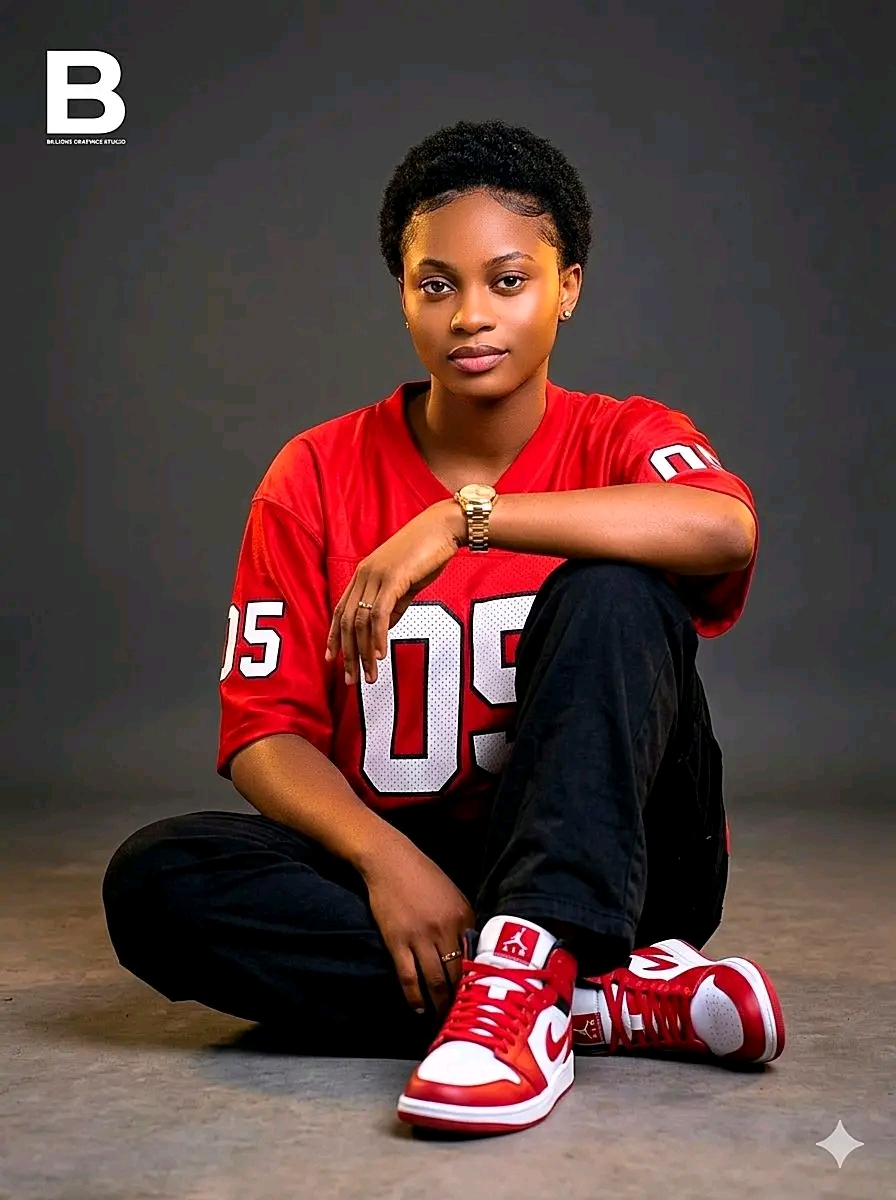
A high-resolution professional studio portrait of a young woman with a dark skin tone, seated casually on a studio floor. She has short, neatly trimmed natural curly black hair, styled close to the head, with a soft, clean hairline. Her face remains 100% identical to the reference image, completely preserved with no alterations, no AI filters, no artificial makeup, only her natural facial features visible—smooth skin, well-defined brows, natural lips, and a calm, slightly serious expression.
She is posed in a relaxed seated position with one knee raised and the other leg folded inward. One arm rests casually over her knee, while the other hand relaxes naturally near her leg. Her head is slightly tilted forward and to the side, giving a composed, introspective, and confident mood.
Outfit & Accessories:
She wears a red oversized sports jersey with bold white numbering (“05”) on the front and sleeve.
Loose-fitting black pants with a soft matte texture.
On her feet are red and white high-top sneakers (Nike Air Jordan 1 style), clean and well-detailed.
Accessories include:
A gold wristwatch on her left wrist
Small earrings
A subtle ring on her finger
Lighting Setup:
Soft, even professional studio lighting, eliminating harsh shadows
Smooth, flattering skin rendering with gentle highlights across the face, arms, and accessories
Subtle warm rim lighting around the edges of her hair and shoulders to create separation from the background
Balanced exposure with a cinematic tone
Background & Environment:
Neutral, minimalistic studio backdrop in a smooth gradient of dark grey tones
Slightly textured concrete floor surface, adding realism and grounding
Clean, distraction-free environment focused entirely on the subject
Typography / Graphic Design Element:
At the top left corner, a clean, modern white capital letter “B”
Directly beneath it, in very small refined font: “BILLIONZ GRAPHICS STUDIO”
Typography is minimal, crisp, and professionally aligned, blending seamlessly with the composition
Camera & Quality Details:
Shot in portrait orientation
Resolution: 3500 × 4700 pixels
Ultra-sharp focus, 8K-level detail
Shallow depth of field with subject in perfect clarity
Professional color grading with slightly warm tones and natural skin accuracy
Mood & Style:
Editorial / magazine-quality portrait
Clean, modern, confident aesthetic
Subtle urban fashion influence
Emotion: calm, self-assured, introspective
She is posed in a relaxed seated position with one knee raised and the other leg folded inward. One arm rests casually over her knee, while the other hand relaxes naturally near her leg. Her head is slightly tilted forward and to the side, giving a composed, introspective, and confident mood.
Outfit & Accessories:
She wears a red oversized sports jersey with bold white numbering (“05”) on the front and sleeve.
Loose-fitting black pants with a soft matte texture.
On her feet are red and white high-top sneakers (Nike Air Jordan 1 style), clean and well-detailed.
Accessories include:
A gold wristwatch on her left wrist
Small earrings
A subtle ring on her finger
Lighting Setup:
Soft, even professional studio lighting, eliminating harsh shadows
Smooth, flattering skin rendering with gentle highlights across the face, arms, and accessories
Subtle warm rim lighting around the edges of her hair and shoulders to create separation from the background
Balanced exposure with a cinematic tone
Background & Environment:
Neutral, minimalistic studio backdrop in a smooth gradient of dark grey tones
Slightly textured concrete floor surface, adding realism and grounding
Clean, distraction-free environment focused entirely on the subject
Typography / Graphic Design Element:
At the top left corner, a clean, modern white capital letter “B”
Directly beneath it, in very small refined font: “BILLIONZ GRAPHICS STUDIO”
Typography is minimal, crisp, and professionally aligned, blending seamlessly with the composition
Camera & Quality Details:
Shot in portrait orientation
Resolution: 3500 × 4700 pixels
Ultra-sharp focus, 8K-level detail
Shallow depth of field with subject in perfect clarity
Professional color grading with slightly warm tones and natural skin accuracy
Mood & Style:
Editorial / magazine-quality portrait
Clean, modern, confident aesthetic
Subtle urban fashion influence
Emotion: calm, self-assured, introspective
📖 Step-by-Step Instructions
💻 On Desktop (Computer)
- Click "Copy Prompt" – a loader will appear then the button confirms the copy.
- Click "Open ChatGPT (Web)" to launch ChatGPT in a new tab.
- Paste the prompt into the chat box (Ctrl+V / ⌘+V).
- If you have a ChatGPT Plus subscription, you can use DALL‑E to generate images – upload your photo when prompted.
- Press Enter and let the AI create your masterpiece.
📱 On Mobile (Phone/Tablet)
- Download the official ChatGPT app from the Google Play Store (Android) or the Apple App Store (iOS).
- Open the app and log in to your OpenAI account.
- Tap the chat input, then long-press and choose "Paste" to insert the copied prompt.
- If you want to use an image, tap the attachment icon (paperclip or image) and select a photo from your gallery.
- Tap the send button and wait for the AI to generate the result (requires ChatGPT Plus for DALL‑E image generation).
💡 Note: For image generation, ChatGPT requires a Plus subscription and the DALL‑E model. The prompt works best when you provide a reference photo.